Docs
Documentation
Guides for getting the most out of Linktanium - tabs, panels, widgets, and more.
Backup & Restore My Data
Download a full backup of your dashboard, and restore it later.
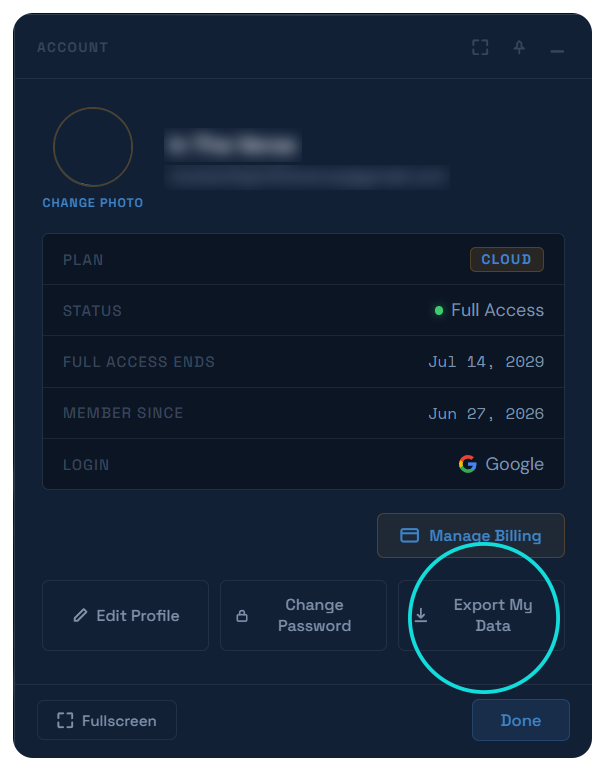
Backup My Data
- Click Backup My Data from the main Account screen, or from the Cancel Subscription screen before confirming a cancellation.
- Downloads a single
.jsonfile namedlinktanium-backup-YYYY-MM-DD.jsoncontaining every tab, panel, and link/note - each with its own colors, icon, and settings - plus your full app preferences (theme, scale, padding, clocks, weather/markets config, and more). - Per-item customization - custom icons, colors, and every other setting on a link, note, or link panel - is included in full, not summarized.
- The download happens instantly in your browser - nothing is emailed or uploaded anywhere.
Restore My Data
- Click Restore My Data on the main Account screen, then choose a
.jsonfile previously downloaded from Backup My Data. - Once a file is chosen, it shows how many tabs, panels, and links it contains before you commit to anything.
- Tabs, panels & links - choose Append to add the backed-up tabs after your current ones (nothing existing is touched), or Overwrite to permanently delete every current tab, panel, and link first and replace them with the backed-up set. Overwrite asks for an extra confirmation before it runs, since it can't be undone.
- Settings - a separate choice from the tabs/panels/links one above. Leave it on Keep Current to restore only your tabs/panels/links, or switch to Restore to also replace your theme, link/title padding, app scale, and other display settings with the ones from the file. Off by default, since replacing your display settings is a different decision than restoring your links.
Actions
Back up your dataAccount → Backup My Data
Restore from a backupAccount → Restore My Data
Add tabs without removing anyRestore My Data → Append
Replace everythingRestore My Data → Overwrite
Also restore theme & sizingRestore My Data → Settings → Restore