Docs
Documentation
Guides for getting the most out of Linktanium - tabs, panels, widgets, and more.
Account & Billing
Profile, password, and subscription management.
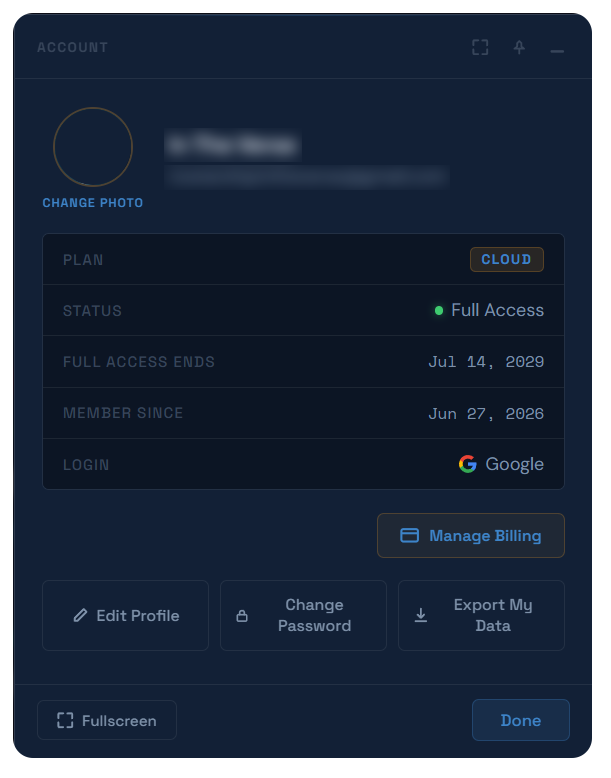
- Open Account from the profile avatar menu in the top-right corner. It shows your plan, status, renewal/trial date, member-since date, and login method (Google or password).
- If you signed in with Google, your profile and password are managed by Google - the Edit Profile and Change Password screens show a notice and disable those fields instead.
- This dialog is itself a pinnable dialog, same as Settings.
- See Edit Profile to update your name.
- See Change Password to change your password or reset a forgotten one.
- See Backup & Restore My Data to download a full backup of your tabs, panels, links, notes, and settings - or restore one later.
Billing
- Go to Account → Manage Billing to view your payment method, next charge amount and date, and full billing history.
- Click Update Card (or Add Card if none is on file) to set your payment method.
- Each billing history row shows the date, description, amount, and status, with a download link for its PDF receipt when one is available.
- Your trial status and days remaining are shown on the main Account screen.
Promo Codes
- Click Have a promo code? on the Billing screen to reveal a code field. Enter your code and click Apply.
- A redeemed code grants Full Access without a paid subscription - this is the "Full Access" status shown on the main Account screen.
Subscribing & Canceling
- When subscribing (or updating your card on a new account), choose Monthly ($2/mo) or Annual ($12/yr, marked "Save 50%"), then enter your card details and the name on the card.
- Use Cancel Subscription on the Billing screen to stop future renewals - you keep full access through the end of your current billing period, then the account reverts to the free tier. There's no partial refund for time already paid.
- The cancellation screen offers Backup my data as a one-click backup before you confirm.
- A canceling subscription shows Resume Subscription on the Billing screen to undo it before the period ends.
Actions
Edit profileAccount → Edit Profile
Change passwordAccount → Change Password
Reset forgotten passwordChange Password → Email me a code to reset my password
Back up my dataAccount → Backup My Data
Manage billingAccount → Manage Billing
Update payment methodAccount → Manage Billing → Update Card
Redeem a promo codeManage Billing → Have a promo code?
Cancel subscriptionManage Billing → Cancel Subscription
Resume a canceling subscriptionManage Billing → Resume Subscription
Download a billing receiptManage Billing → billing history row → download icon